|
一、什么是Bean Shell - BeanShell是一种完全符合Java语法规范的脚本语言,并且又拥有自己的一些语法和方法;
- BeanShell是一种松散类型的脚本语言(这点和JS类似);
- BeanShell是用Java写成的,一个小型的、免费的、可以下载的、嵌入式的Java源代码解释器,具有对象脚本语言特性,非常精简的解释器jar文件大小为175k。
- BeanShell执行标准Java语句和表达式,另外包括一些脚本命令和语法。
二、Jmeter有哪些Bean Shell - 定时器: BeanShell Timer
- 前置处理器:BeanShell PreProcessor
- 采样器: BeanShell Sampler
- 后置处理器:BeanShell PostProcessor
- 断言: BeanShell断言
- 监听器: BeanShell Listener
BeanShell与JMeter的关系JMeter提供5种方式使用BeanShell- BeanShell Sampler
直接使用BeanShell来编写样例。 - BeanShell PreProcessor
在样例触发前,使用BeanShell进行加工处理。 - BeanShell PostProcessor
在样例触发后,使用BeanShell进行加工处理。 - BeanShell Assertion
使用BeanShell进行断言处理。 - BeanShell Listener
使用BeanShell做监听器。
BeanShell的内置对象对象名存在元素功能
logBeanShell Sampler
BeanShell PreProcessor
BeanShell PostProcessor
BeanShell Assertion
BeanShell Listener日志信息输出
LabelBeanShell Sampler样例
FileNameBeanShell Sampler文件名
ParametersBeanShell Sampler参数
bsh.argsBeanShell SamplerBeanShell脚本
SampleResultBeanShell Sampler
BeanShell Assertion
BeanShell Listener样例结果
ResponseCodeBeanShell Sampler
BeanShell Assertion返回的状态码
ResponseMessageBeanShell Sampler
BeanShell Assertion返回信息
IsSucessBeanShell Sampler是否成功
ctxBeanShell Sampler
BeanShell PreProcessor
BeanShell PostProcessor
BeanShell Assertion
BeanShell ListenerJMeter的上下文
varsBeanShell Sampler,BeanShell PreProcessor
BeanShell PostProcessor
BeanShell Assertion
BeanShell Listener变量操作
propsBeanShell Sampler
BeanShell PreProcessor
BeanShell PostProcessor
BeanShell Assertion
BeanShell ListenerJMeter属性
prevBeanShell PreProcessor
BeanShell PostProcessor
BeanShell Listener样例的前置结果读取
samplerBeanShell PreProcessor
BeanShell PostProcessor当前样例
ResponseBeanShell Assertion返回的对象,读-写
FailureBeanShell Assertion是否失败
FailureMessageBeanShell Assertion失败信息
ResponseDataBeanShell Assertion返回数据体,字节形式
ResponseHeaderBeanShell Assertion返回信息头
RequestHeaderBeanShell Assertion请求信息头
SampleLabelBeanShell Assertion样例名称
SampleDataBeanShell Assertion发送至服务器的数据
SampleEventBeanShell Listener读取当前样例的事件
有了上面的操作对象,可以在测试过程中,对测试的内容,进行更加详细的加工。
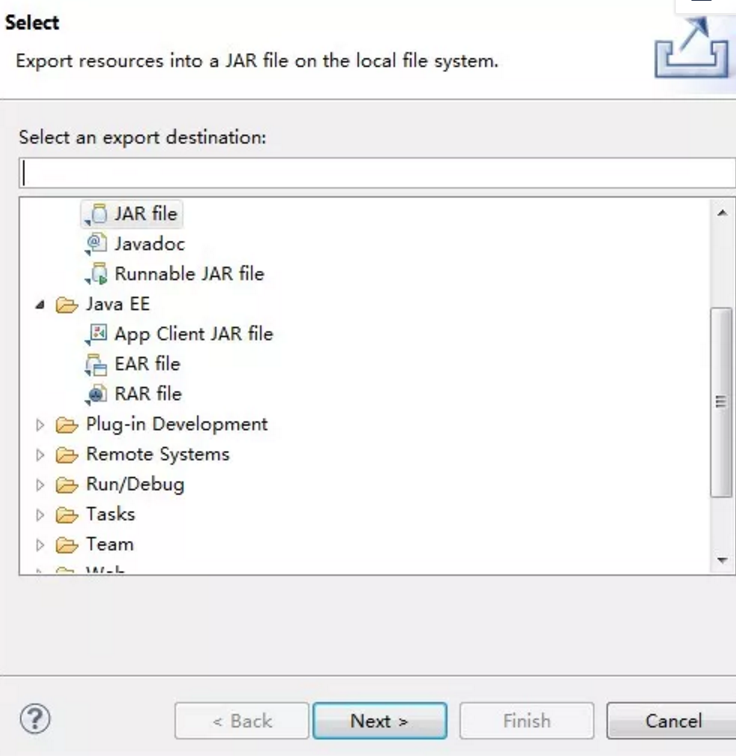
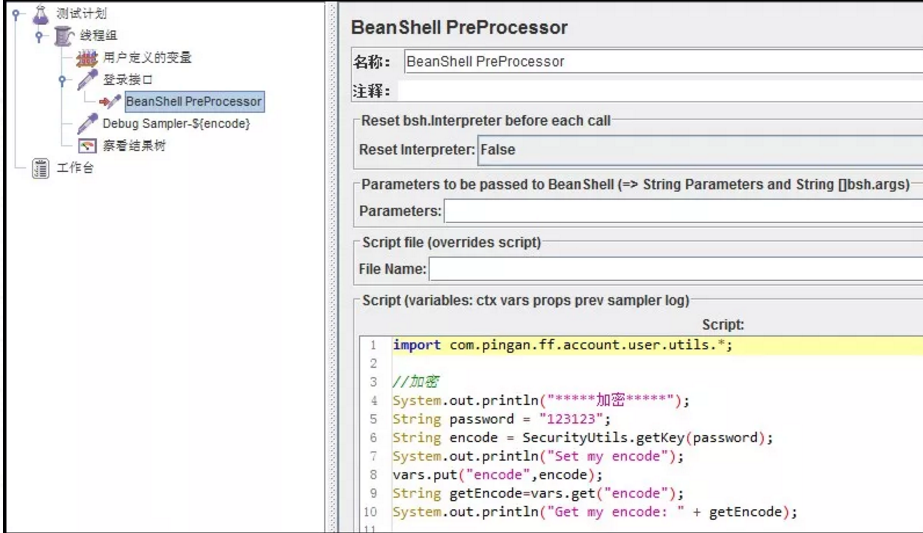
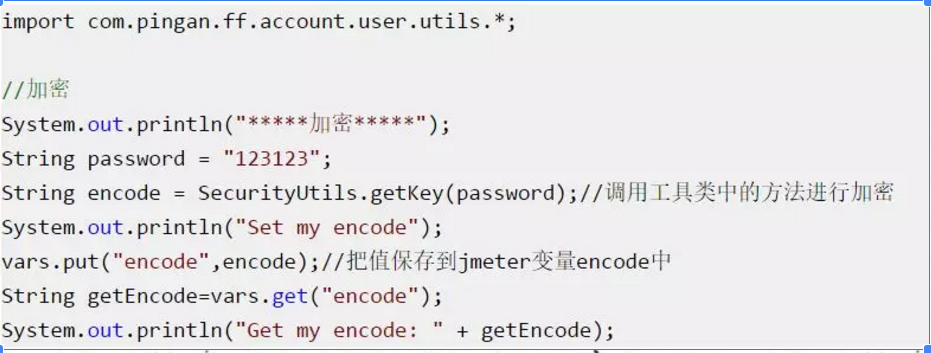
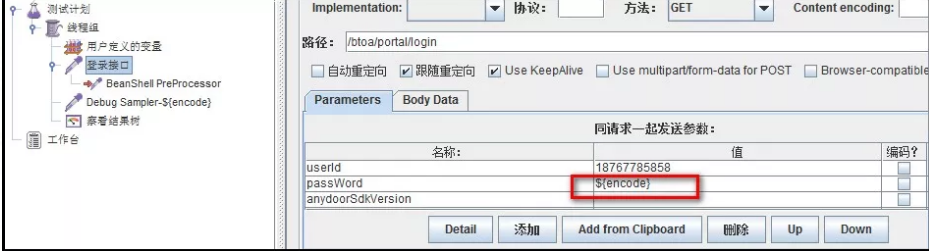
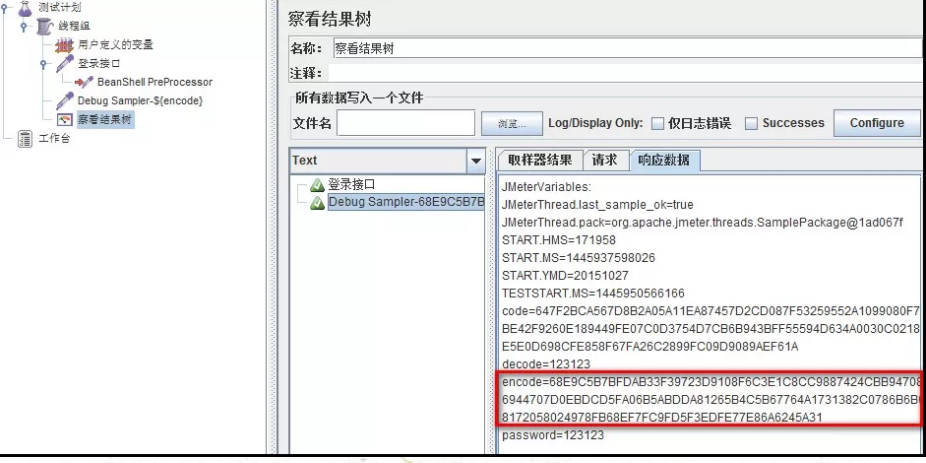
三、BeanShell的用法 在此介绍下BeanShell PreProcessor的用法,其它的beahshell可以类推。在此我们使用beahshell调用自己写的工具类,工具类实现了密码的加、解密功能: 1、在eclipse写好代码,然后把该类打成jar包(在类上点击右键->Export->jar file) 2、把jar包放到jmeter目录\apache-jmeter-2.13\lib\ext下 3、打开jmeter,添加一个http sampler(调用登录接口),在sampler下添加一个BeanShell PreProcessor 4、在beanshell PreProcessor中导入我们的jar包,调用里面的加、解密码方法,把结果保存在jmeter变量中,下面两个方法是beanshell中我们最常用到的: vars.get(String paramStr):获得变量值 vars.put(String key,String value):,将数据存到jmeter变量中 5、把加密后的密码存到jmeter变量中,然后在http sampler中就可以通过${encode}进行使用了: 6、执行脚本: 四、Bean Shell常用内置变量 JMeter在它的BeanShell中内置了变量,用户可以通过这些变量与JMeter进行交互,其中主要的变量及其使用方法如下: log:写入信息到jmeber.log文件,使用方法:log.info(“This is log info!”); ctx:该变量引用了当前线程的上下文 vars - (JMeterVariables):操作jmeter变量,这个变量实际引用了JMeter线程中的局部变量容器(本质上是Map),它是测试用例与BeanShell交互的桥梁,常用方法: a) vars.get(String key):从jmeter中获得变量值 b) vars.put(String key,String value):数据存到jmeter变量中 props - (JMeterProperties - class java.util.Properties):操作jmeter属性,该变量引用了JMeter的配置信息,可以获取Jmeter的属性,它的使用方法与vars类似,但是只能put进去String类型的值,而不能是一个对象。对应于java.util.Properties。 a) props.get("START.HMS");注:START.HMS为属性名,在文件jmeter.properties中定义 b) props.put("PROP1","1234"); prev - (SampleResult):获取前面的sample返回的信息,常用方法: a) getResponseDataAsString():获取响应信息 b) getResponseCode() :获取响应code sampler - (Sampler):gives access to the current sampler
jmeter自带函数获取系统当前时间//当前时间${__timeShift(,,,,)}//增加一天${__timeShift(,,P1d,,)}//增加七天时间格式化${__timeShift(yyyy-MM-dd,,P7d,,)}//减少七天时间格式化${__timeShift(yyyy-MM-dd,,-P20d,,)}//当前时间时间格式化${__timeShift(yyyy-MM-dd,,,,)}//增加一H ${__timeShift(,,PT1H,,)}${__timeShift(yyyy-MM-dd HH:mm:ss:SSS,,,,)}${__timeShift(yyyy-MM-dd HH:mm:ss:SSS,,P1d,,)}${__timeShift(yyyy-MM-dd HH:mm:ss:SSS,,PT1H,,)}${__timeShift(yyyy-MM-dd HH:mm:ss:SSS,,PT10m,,)}${__timeShift(yyyy-MM-dd HH:mm:ss:SSS,,PT20S,,)}${__timeShift(yyyy-MM-dd HH:mm:ss:SSS,,P1dT1H10m20s,,)}${__time(YMDHMS,)}${__time(YYYYMMDHMS,)}
浮点时间戳转换为标准时间 import java.text.SimpleDateFormat;import java.util.Calendar;import java.util.Date;//10位的秒级时间戳long time1 = ${time}; //获取时间戳变量String result1 = new SimpleDateFormat( "yyyy-MM-dd HH:mm:ss" ).format( new Date(time1 * 1000 ));log.info( "10位时间戳(秒)--->Date:" +result1); //13位的毫秒级时间戳//double time2 = 1515730332000d;//String result2 = new SimpleDateFormat("yyyy-MM-dd HH:mm:ss").format(time2);//System.out.println("13位数的时间戳(毫秒)--->Date:" + result2);
解析jsonlist //利用beanshell获取到json响应,而后经过JSONObject 和JSONArray 将数组解析,遍历数组的length以后,提取参数值//导入json包import org.json.*;//获取获取请求的返回值String response_data = prev.getResponseDataAsString(); //日志打印获取请求的返回值log.info(response_data);//将String类型的返回值构形成JSONObject对象JSONObject data_obj = new JSONObject(response_data);//获取做为下一个请求post的参数值Province(两种方式)//String Provincelist_str = data_obj.get("Province").toString(); JSONArray Provincelist_str = data_obj.getJSONArray( "Province" );//log.info(Provincelist_str);//获取Province数组的长度int len = Provincelist_str.length(); String strlen = Integer.toString(len); vars.put( "MessageNum" ,strlen);log.info(strlen);int i = 0 ;for (;i < len;++i){//获取 data[ i ] 数组对象JSONObject jsonTemp = (JSONObject)Provincelist_str.getJSONObject(i);switch (i){case 0 ://两种提取参数的写法String NameItems = jsonTemp.getString( "Name" );// String NameItems = jsonTemp.get("Name").toString();// 两种打印参数的方法// vars.put("Name_1", jsonTemp.getString("Name")); vars.put( "Name_1" , NameItems); log.info(NameItems);}}
|



 发表于 2024-9-1 17:05:23